
Duke Energy will be replacing telephone poles in our complex on Saturday, March 23 and Sunday, March 24. The power will be out most of the day Saturday, and possibly Sunday. I will be powering off all of our services Saturday morning and will power them back on Sunday late afternoon/early evening. Timesheet reporting, email and all other network services will be unavailable at this time. Please plan accordingly.
Category Archives: Uncategorized
2018 Safety Meeting
Our quarterly safety meeting will be held on Wednesday, March 14, 2018 beginning at 7:00 am at Hilton Garden Inn located at 5255 Noggle Way, Indianapolis IN 46237.
A breakfast buffet will be provided.
This is a mandatory meeting, anyone who will not be able to attend will need to contact their Project Superintendent or myself immediately.
INDOT Asks Motorists to Prepare for August 21 Solar Eclipse
Plan ahead for best viewing and avoid traffic congestion
INDIANAPOLIS — Indiana Department of Transportation officials urge motorists to plan for traffic congestion expected to occur in southern Indiana before and after the total solar eclipse on August 21. Approximately 200 million people live within a day’s drive of the total eclipse path. Many will be on the road to get a closer view.
INDOT officials offer the following advice:
-
Barred for traffic congestion before and after the August 21 eclipse.
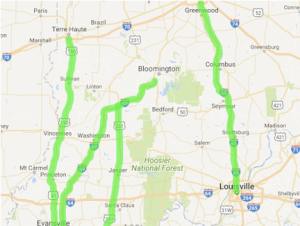
Interstate 69, U.S. 41, and U.S. 231 are expected to experience increased traffic in southbound lanes before the event as caravans of motorists head for Western Kentucky where the moon’s full eclipse of the sun can be viewed within a 70-mile-wide swath encompassing Hopkinsville, Paducah, and Madison, KY. After the event, transportation planners anticipate a “mass exodus” from total eclipse regions. Expect heavier than normal northbound traffic on these routes.
Interstate 65 will also see increased traffic going to—and returning from—total eclipse vantage points that begin at Bowling Green, KY and extend beyond Nashville, TN. Again, southbound traffic is expected to rise before the solar eclipse. Northbound lanes will experience congestion after the eclipse.
-
If you want to drive toward the eclipse path for better viewing, allow extra time.
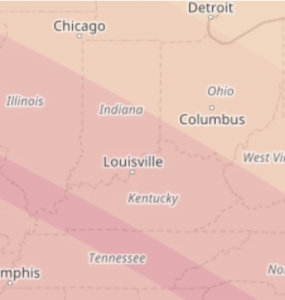
If skies are clear, August 21’s solar eclipse promises to be an unforgettable celestial phenomenon, the first that has been visible to all 48 contiguous states in several hundred years. Beyond the total eclipse’s 70-mile-wide path—which arcs across 14 states from Oregon to South Carolina—a partial eclipse will provide a sky show that becomes more and more pronounced the closer spectators get to the sun’s full black-out. The partial eclipse can be well seen throughout Indiana, but traveling south improves the view. For example, Evansville is situated to experience a partial eclipse of 99 percent and Jeffersonville will see 96 percent. This mid-day event waxes and wanes over a period of several hours.
-
Make plans now for overnight accommodations—overnight camping is prohibited at rest areas.
-
If planning to view the eclipse, wear safety glasses. They are available on-line or from many popular retailers costing from $2 to $70; some are being given away by organizations. DO NOT look at the partial eclipse without proper filtration.
-
Visit the NASA website at http://eclipse2017.nasa.gov.
Annual CCS Drug Screen
Our annual CCS drug screen will be held on Wednesday 07/12/17 at our Greenwood office.
Outside Plant personnel, City County, Roche, Methodist, IU and Eskenazi dedicated technicians will need to report at 7:00 am.
Inside Plant personnel and T&M technicians will need to report at 8:00 am.
Office staff and Management should report at 9:00 am.
We will be serving doughnuts and drinks during this time, but we will NOT be conducting a Quarterly Meeting on this date. Our 3rd Quarter Safety Meeting will be held on Thursday 09/07/2017.
All employees will need to complete annual screening, gather any paperwork being distributed, and will then be expected to report to their assigned job sites.
If you have any questions, please contact your Project Superintendent immediately. This is a mandatory testing procedure.
Thank you.
Jeremy Burke
Ann
REPOST: Groupwise Mobility Service Setup Instructions
Groupwise iPhone setup instructions (Other OS devices should be similar)
NOTE: Setting up your OS devices will NOT pull ALL emails from your mailbox. The Mobility Server only displays the past 14 days. PLEASE do not forget to occasionally log into Groupwise Webaccess to manage your mailbox.
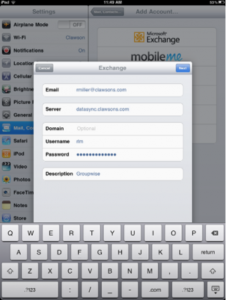
Navigate to Settings->Mail, Contacts, Calendars->Add Account->Microsoft Exchange
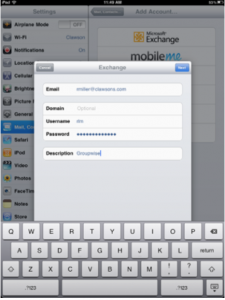
Enter your email address, leave the domain field blank, enter your username, and finally, enter your Groupwise password.
Click “Continue” if you receive a message stating “Cannot Verify Server Identity”
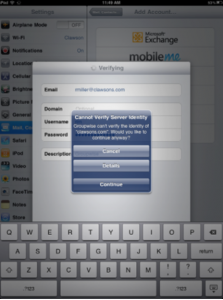
Enter datasync.clawsons.com in the server field and click next. Continue with defaults and your OS device will now receive corporate email.
2017 2nd Quarter Safety Meeting
Our 2nd Quarter Safety Meeting will be held on Thursday April 27, 2017. This meeting will be at our Greenwood shop warehouse, and will begin at 7:00 am.
We will be serving Long’s donuts, juice, milk and coffee for the meeting. We will be covering our new MSDSonline system and answering any questions.
Stuart Bridges with Stuart Fire Prevention will also be conducting fire and fire extinguisher training. Weather permitting, we will also have live fires in the back lot and conduct hands-on training for fire extinguishers.
All employees with job boxes, or company vehicles, need to ensure they bring their fire extinguishers in for annual service at this meeting.
If anyone has any questions, or will not be able to attend this meeting, please let me know as soon as possible.
Thank you.
Jeremy Burke
Safety Director
Clawson Communications, Inc.
(317) 886-5301 Office
Qtr1 Safety Meeting
Our 1st Quarterly Safety Meeting of 2017 will be held on Tuesday 02/07/17 at the Hilton Garden Inn located at 5255 Noggle Way, Indianapolis IN 46237. (The northeast corner of Emerson Avenue and County Line Road, just off of I-65, behind the Kroger Marketplace).
Registration and breakfast will begin at 7:00 am.
All employees with Job Boxes will need to bring those with them for inspection and updated paperwork.
It will be easiest to park on the North side of the building, and then enter through the northern door on the west side of the building. This will bring you in right next to the meeting room.
If anyone will not be able to make this meeting, or has any questions, please let me know as soon as possible.
2017 Qtr 1 Safety Meeting
Our 2017 Quarter 1 Safety Meeting will be held Tuesday 02/07/17 at 7:00 at the Hilton Garden Inn, 5255 Noggle Way, Indianapolis, IN 46237. Please keep posted for more details.
Employee List/Groupwise Address Book
If you have a mobile device, and are successfully connected to the Groupwise Mobility Server, you can search for any employee to obtain cell numbers, email addresses and mailbox extensions without having to manually add them. These instructions are for IOS, Android instructions should be similar.
To find an employee’s contact information:
Open your mobile device contacts by selecting the app:

Select “Groups” in the top left-hand corner
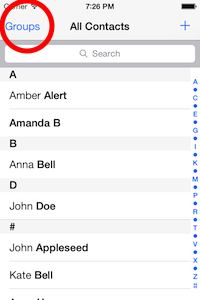
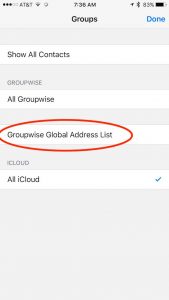
Select the Groupwise Global Address Book
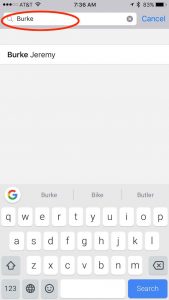
begin typing the name of the employee you are searching for. Once the employee’s name appears, select the name for to open their information.
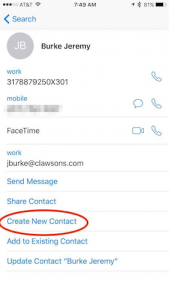
To permanently add them to your personal address book, click “Create New Contact”.
Groupwise Mobility Service/Authentication Change
I will be making a change to our Groupwise Mobility Service Server Friday afternoon, May 20. I will be changing the authentication method from LDAP to Groupwise Authentication.
What this means:
You will need to change the password on your mobile device to your Groupwise Password. This is the password you use to log into Groupwise Webaccess at http://grpwise.clawsons.com/gw/webacc
Once I have switched the authentication method, you should get a popup asking to re-enter your password when you retrieve email. Please enter your GROUPWISE password (this password should be saved in your settings once entered). If you do not receive a popup, change your password manually. On an apple device:
1. Navigate to Settings->Mail, Contacts, Calendars
2. Select your Groupwise Account
3. Select your mail account
4. Change your password to your Groupwise password.
Other OS’s procedures should be similar.
I have contacted Novell to confirm the change will not have any ill effects. The only implications are a change in the mobile device password settings.
If you have any questions, please call me on x334
Thanks,
-Rick